
Be prepared, not overwhelmed.
Organize screenshots, notes, timelines, evidence, and court dates in one private record.
Free to start — no credit card needed.
Where are you right now?
Pick the spot that fits — we’ll meet you there.
I'm just exploring
Testing the waters, or not sure yet. Poke around the real workspace — no sign-up.
Try the demoI'm planning a case
Not in court yet, but starting to gather the facts and evidence.
Start your recordI've been served papers
There's a deadline on the calendar and you need to respond.
See the processHigh-conflict case
Tense situations that need careful, dated documentation over time.
Document it safelyThe parts that are actually hard
Making a list of what happened is the easy part. These are the things that are difficult to keep straight over months of a file — and where SteadCase does the most work.
Two clocks on parenting time
PlusKeep the schedule and what actually happened against it as two separate records. An exchange that ran forty minutes late becomes a dated entry with a number attached, instead of something remembered differently three months later.
Their exact words, kept exact
FreePin a verbatim statement to the message or document it came from, with who said it, when, and where. The attribution travels with the quote all the way into your exports, so nothing rests on your paraphrase.
Patterns, not just incidents
PlusTag observable conduct against the factors Ontario's Children's Law Reform Act already asks the court to weigh. Conduct that looks minor entry by entry is visible as behaviour over time.
Exports that do not overshare
PlusSwap real names for role labels, redact anything by hand, and choose exactly which exhibits and images go in. What you hand to a lawyer, a mediator or the other side is what you meant to hand over.
The money, tracked properly
CaptureSection 7 expenses with their receipts, support paid and received, and legal fees against the hearing they belong to — logged as they happen rather than reconstructed the week before a conference.
Each label is the plan that unlocks it. Free includes capped amounts of the everyday logging — the plans below give the exact limits.
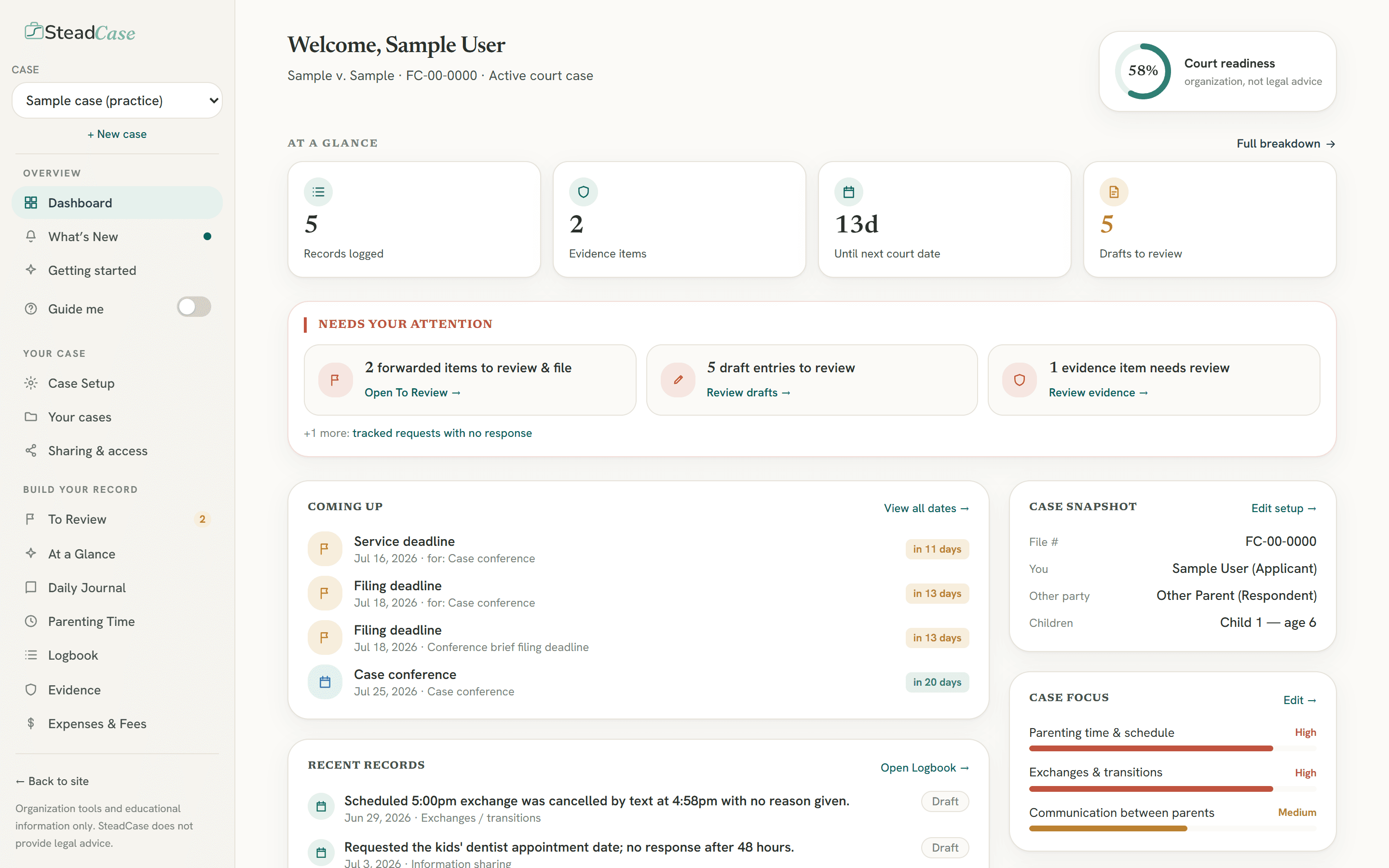
The web app
Your whole case, in one calm place.
The full SteadCase workspace on your computer — your timeline, evidence, court dates and exports, organized and ready the moment you need them.
One organized case
Logbook, journal, evidence and parenting time — connected, not scattered across your phone and inbox.
Court-ready exports
Turn your record into a clean chronology and evidence list a lawyer can actually read.
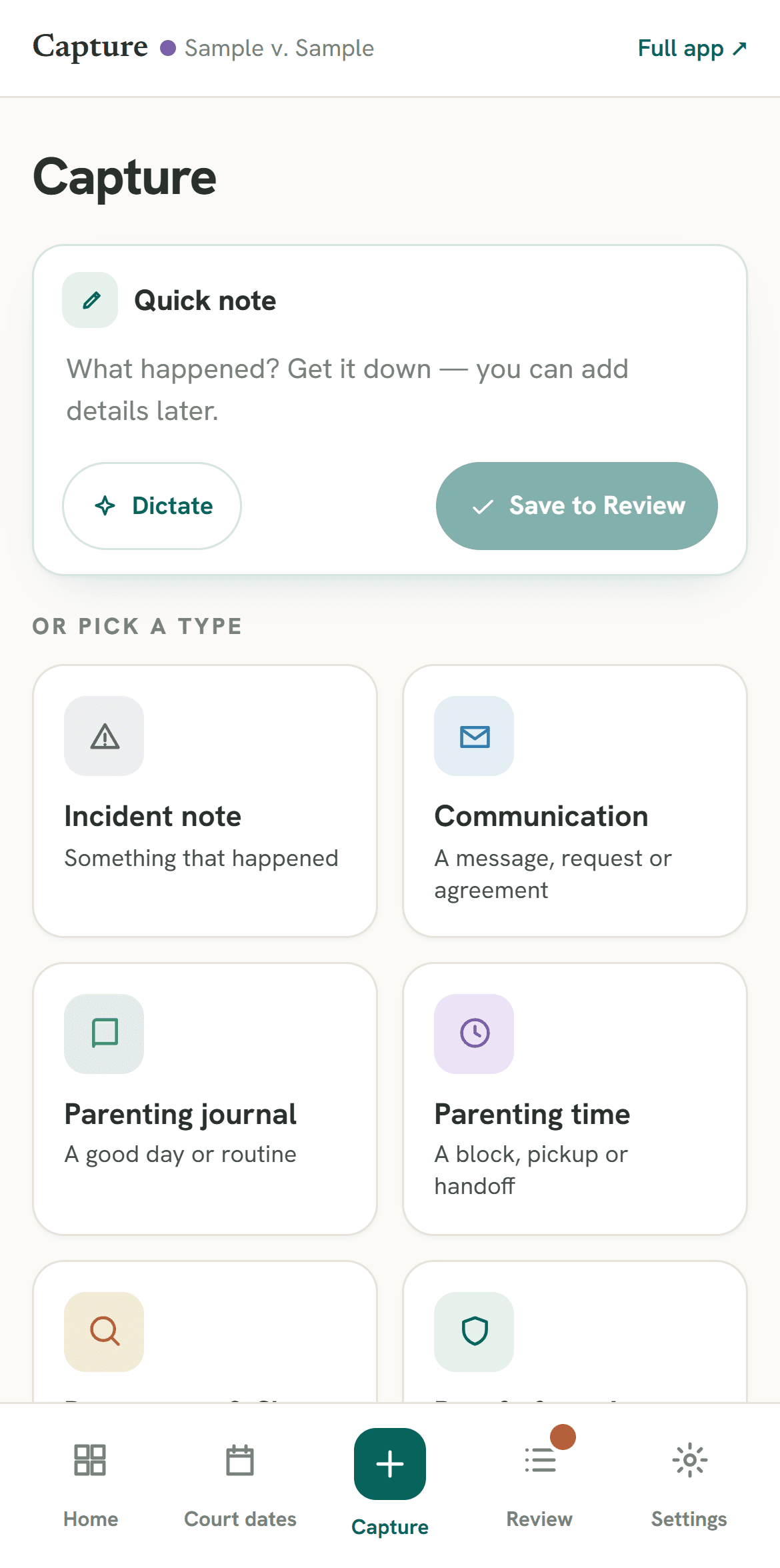
The companion app
Capture everything, anywhere.
The companion app for SteadCase. Log incidents, upload evidence, and record notes the moment they happen.
Install on your phone
Add it to your home screen today as a web app — a full App Store download is on the way.
Simple pricing
$5/mo for your first 3 months, then $9/mo — or included with any paid SteadCase plan.
A guided look — at your own pace
Explore the real desktop workspace — tap a highlight to see what each part does. No sign-up needed.
Choose your plan
Start free. Move up only when your case needs more.
Free
Explore the platform
- Daily parenting journal — up to 10 entries/month
- Limited case dashboard preview
- Up to 5 incident entries
- Up to 5 evidence entries
- Court date & deadline tracker
- 250 MB evidence file storage
- Downloadable checklist
- Ontario resource links
Capture
Capture on the go
- Mobile-first capture — log a moment in seconds
- Quick incident, journal & exchange notes
- Snap & upload evidence from your phone
- Forward emails straight into your case
- Snap & keep section 7 expense receipts (daycare, medical, activities)
- “To Review” inbox — promote captures into your Logbook
- 1 GB evidence file storage (250 MB on Free)
Lite
Organize the basics
- Case dashboard
- Unlimited incident log, journal & evidence tracker
- Court date & deadline tracker
- Response tracking — what you asked, and when it was answered
- Document allegations with your factual response
- Section 7 expense tracker — log child-related expenses with their receipts
- Basic chronology & evidence-list export
- At a Glance — your record, counted: exchanges, reply times, allegations
- Court Roadmap pop-out — guides, rules & next steps for each stage
- Ontario family court preparation checklist
- 25 GB evidence file storage
Plus
Prepare for active litigation steps
- Everything in Lite
- Tailor your export — pick exactly which exhibits and images go in
- Redaction — role labels instead of real names, plus redact anything by hand
- Filter exports by issue, date range, or evidence status
- Guided prep for each of your court dates
- Parenting-time tracker — scheduled vs. what happened
- Expense tallies — section 7 totals by category, legal fees per hearing
- At a Glance — gaps-to-consider checklist on top of your Lite rollups
- One-click lawyer consultation package
- 50 GB evidence file storage (25 GB on Lite)
Pro
Complex, document-heavy cases
- Everything in Plus
- High-conflict pattern view — your tagged entries counted by the CLRA s.24 factor each relates to
- Parenting-time insights — planned against recorded time, with school, vacation and third-party care totalled
- AI receipt reading — snap a section 7 receipt and the amount, date and category are suggested for you to confirm
- Personalized Court Roadmap — fill and save the forms for your role straight to Drafts
- 100 GB secure evidence storage (50 GB on Plus)
Prices are in Canadian dollars. If you're outside Canada, checkout shows the price in your local currency.
Cancel anytime — your data is always yours to export.
Good to know
Is SteadCase legal advice?
No. SteadCase provides organization tools and educational information only. It is not a law firm and does not provide legal advice. It is not a substitute for advice from a licensed lawyer, paralegal, court staff, or legal clinic.
Who is SteadCase for?
People preparing for family court, mediation, a lawyer consultation, or self-represented litigation who want their incidents, evidence, dates and notes organized in one private place.
Where does SteadCase work?
The Court Roadmap, reference guides and court-form walkthroughs are built on Ontario law and the Ontario family-court process. Everything you record — evidence, parenting time, journal, expenses, court dates and exports — works wherever your case is. If you set a case to somewhere other than Ontario, the Ontario-specific sections are hidden rather than shown to you with the wrong rules attached.
Does SteadCase fill out court forms for me?
Not today. SteadCase points you to the official Ontario form for each step, keeps your drafts together in one place, and on Plus it can compose the filings that have no prescribed form. Guided drafting — an interview that fills the official PDF from what you have already recorded — is built for three forms so far and is being extended before it goes on sale with Pro. Anything SteadCase produces is left unsigned and unsworn for you to review, sign and file: it never signs or files anything for you, and it does not tell you what to put in a form.
Is my information private?
Your case data lives in your own account and is stored in Canada. We design SteadCase to keep your materials private to you and the people you choose to share an export with. Some of our service providers (hosting, email, analytics and payments) operate in Canada and the United States — the Privacy Policy sets out exactly who does what.
Free to start — no credit card needed
Start organizing your case today.
A free account keeps your record private to you. Start for free — upgrade only when you need more.